
Separation of Powers
Separation of Powers
After separation of powers is enabled, system administration, user authorization, and security auditing are assigned to different administrators. No single administrator can perform all administrative operations.
The feature described on this page is available starting from V2.0.11.1.
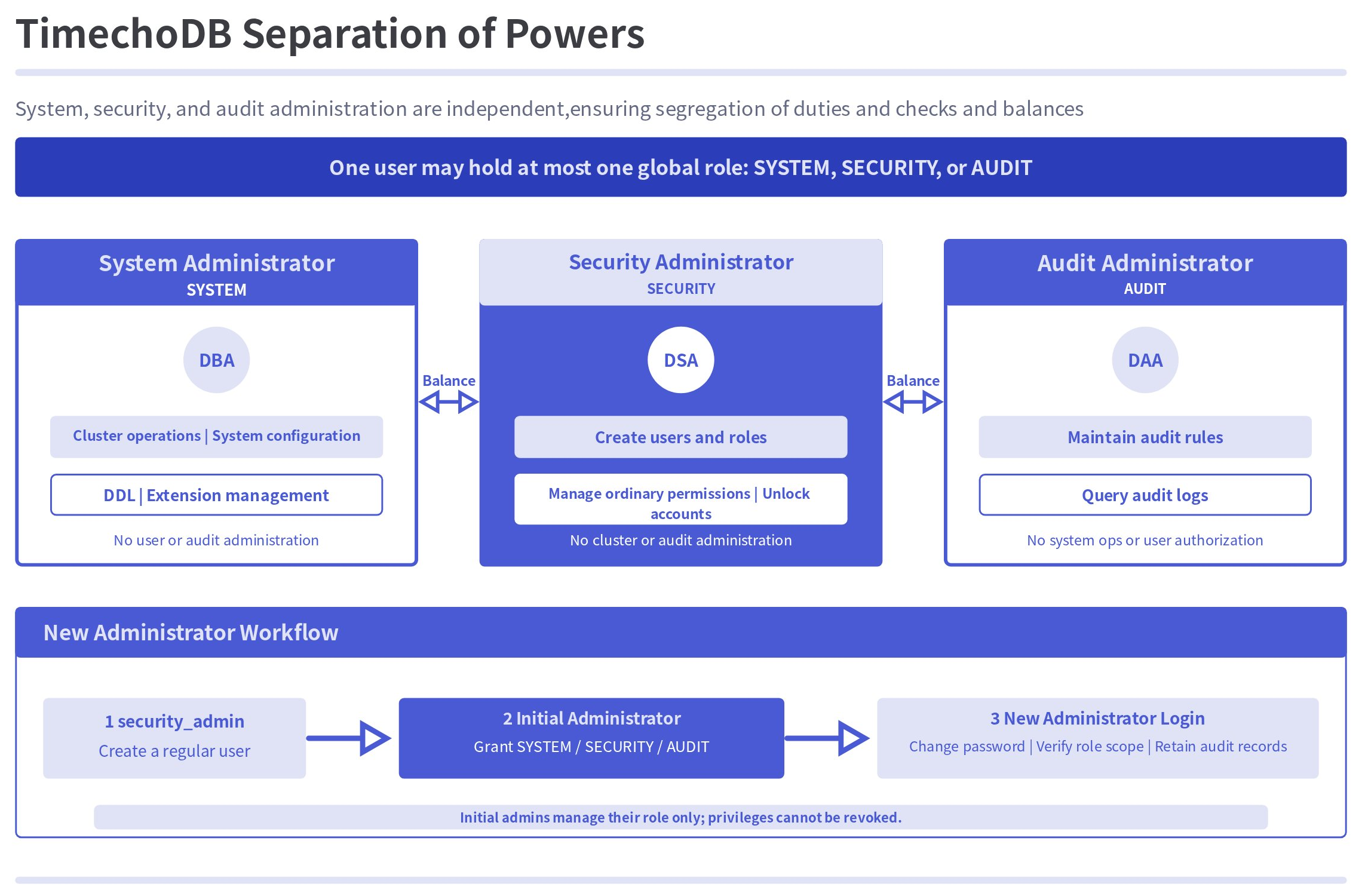
The global privileges and responsibilities of each administrator type are as follows:
| Administrator | Global privilege | Primary responsibilities |
|---|---|---|
| System administrator (DBA) | SYSTEM | Cluster operations, system configuration, DDL, and other system administration operations. |
| Security administrator (DSA) | SECURITY | Manages users and roles and grants privileges to ordinary users or roles. |
| Audit administrator (DAA) | AUDIT | Maintains audit rules and views audit logs. |
For basic concepts and SQL syntax related to ordinary users, roles, and data privileges, see Authority Management (From V2.0.7).
1. Usage
1.1 Configuration
Set the following parameter in iotdb-system.properties:
| Parameter | Default | Effective mode | Description |
|---|---|---|---|
enable_separation_of_powers | false | Hot reload | Specifies whether to enable separation of powers. The initial value is false, and the value can only be changed from false to true. It cannot be changed back to false after the feature is enabled. |
enable_separation_of_powers=trueWarning: Separation of powers cannot be disabled after it is enabled, and the original
rootuser will immediately be unable to log in.
1.2 Initial Administrators
When separation of powers is enabled for the first time, the system automatically creates three built-in initial administrators:
| Username | Administrator type | Default global privilege |
|---|---|---|
sys_admin | Initial system administrator | SYSTEM |
security_admin | Initial security administrator | SECURITY |
audit_admin | Initial audit administrator | AUDIT |
The default password for all three initial administrators is TimechoDB@2021. Change each password immediately after the first login.
The username and password of an initial administrator can only be changed by that account. The corresponding global privilege of an initial administrator cannot be revoked.
2. Administration Model
2.1 Core Principles
- A user can hold only one of the
SYSTEM,SECURITY, andAUDITadministrative privileges, but can still receive ordinary data privileges as required. - The system can have multiple system, security, and audit administrators.
- Only the initial system administrator can grant or revoke the
SYSTEMprivilege. - Only the initial security administrator can grant or revoke the
SECURITYprivilege. - Only the initial audit administrator can grant or revoke the
AUDITprivilege. - A security administrator must first create a new administrator as an ordinary user. The corresponding initial administrator then grants the required global privilege.
2.2 Ordinary Users and Roles
- Ordinary users do not have the
SYSTEM,SECURITY, orAUDITglobal privilege. Only security administrators can create ordinary users or grant and revoke their ordinary privileges. - Roles can contain only ordinary privileges. Security administrators are responsible for creating and deleting roles, assigning roles to users, and granting or revoking role privileges.
2.3 Creating an Administrator
- Use
security_adminto create a user. - Log in as
sys_admin,security_admin, oraudit_admin, depending on the required administrator type. - Grant
SYSTEM,SECURITY, orAUDITto the new user. - Log in with the new administrator account, change the password set when the user was created, and verify that the account can perform only the corresponding administrative operations.
- Check the audit logs for the user creation and privilege grant records.
3. Authorization by Operation
3.1 Common Features
User Management
| Operation | System administrator | Security administrator | Audit administrator |
|---|---|---|---|
| Create a user | Not supported | Supported | Not supported |
| Delete a user | Not supported | Can delete ordinary users; only the initial security administrator can delete other security administrators | Not supported |
| Change a user password | Can change only their own password | Can change ordinary user passwords; the initial security administrator can change only their own password, while other security administrators' passwords can be changed by the initial security administrator | Can change only their own password |
| Unlock a user | Not supported | Supported | Not supported |
| Rename a user | Can rename only their own account | Can rename ordinary users; the initial security administrator can rename only their own account, while other security administrators can be renamed by the initial security administrator | Can rename only their own account |
| Set a user's connection limit | Not supported | Can change the limit for users other than initial administrators; the initial security administrator can change only their own limit | Not supported |
| Query users | An ordinary system administrator can see only themselves; the initial system administrator can see all system administrators | Can see all users | An ordinary audit administrator can see only themselves; the initial audit administrator can see all audit administrators |
| Grant or revoke a user's global privilege | Only the initial system administrator can manage SYSTEM | Only the initial security administrator can manage SECURITY | Only the initial audit administrator can manage AUDIT |
| Grant or revoke an ordinary user's privileges | Not supported | Supported | Not supported |
| Query user privileges | An ordinary system administrator can view only their own privileges; the initial system administrator can view all system administrators | Can view all users | An ordinary audit administrator can view only their own privileges; the initial audit administrator can view all audit administrators |
Role Management
| Operation | System administrator | Security administrator | Audit administrator |
|---|---|---|---|
| Create or delete a role | Not supported | Supported | Not supported |
| Query roles | An ordinary system administrator can view only their own roles; the initial system administrator can view the roles of all system administrators | Supported | An ordinary audit administrator can view only their own roles; the initial audit administrator can view the roles of all audit administrators |
| Grant or revoke role privileges | Not supported | Supported for ordinary privileges only | Not supported |
| Grant or revoke a user's role | Not supported | Supported | Not supported |
| Query role privileges | An ordinary system administrator can view only privileges of their own roles; the initial system administrator can view the roles of all system administrators | Can view all roles | An ordinary audit administrator can view only privileges of their own roles; the initial audit administrator can view the roles of all audit administrators |
Security Audit
| Feature or operation | System administrator | Security administrator | Audit administrator |
|---|---|---|---|
| Maintain and query audit log rules | Not supported | Not supported | Supported |
Cluster Operations
| Feature or operation | System administrator | Security administrator | Audit administrator |
|---|---|---|---|
| View ConfigNode, DataNode, cluster, and Region information, or migrate Regions | Supported | Not supported | Not supported |
| Query common information such as the version, timestamp, and current user | Supported | See the corresponding SQL statement for the supported scope | See the corresponding SQL statement for the supported scope |
| Flush data, clear caches, set the system status, repair data, and perform other cluster operations | Supported | Not supported | Not supported |
| View and terminate queries | Supported | Can operate only on their own queries | Can operate only on their own queries |
SET CONFIGURATION | Supports ordinary system configuration | Supports security configuration marked SECURITY | Supports audit configuration marked AUDIT |
LOAD CONFIGURATION | Prohibited globally | Prohibited globally | Prohibited globally |
UDF Management
| Feature or operation | System administrator | Security administrator | Audit administrator |
|---|---|---|---|
| Create or delete a UDF | Supported | Not supported | Not supported |
| Show or use a UDF | Supported | Supported | Supported |
Stream Processing
| Feature or operation | System administrator | Security administrator | Audit administrator |
|---|---|---|---|
| Create, delete, modify, start, or stop a Pipe | Supported | Not supported | Not supported |
| Show Pipes | Supported | Can view only Pipes related to the current user | Can view only Pipes related to the current user |
| Create, delete, or show Pipe plugins | Supported | Not supported | Not supported |
| Create, show, or delete topics, and delete or view subscriptions | Supported | Not supported | Not supported |
| Consume a subscription topic | Access is determined by the current user's data privileges | Access is determined by the current user's data privileges | Access is determined by the current user's data privileges |
Database Management
| Feature or operation | System administrator | Security administrator | Audit administrator |
|---|---|---|---|
| Create, alter, or drop a database | Can operate on ordinary databases, but not the audit database | Requires the corresponding CREATE, ALTER, or DROP privilege on the target database | Requires the corresponding CREATE, ALTER, or DROP privilege on the target database |
| Show databases | Can view ordinary databases | Can view only ordinary databases they are authorized to access | Can view the audit database and ordinary databases they are authorized to access |
AINode Model Management
| Feature or operation | System administrator | Security administrator | Audit administrator |
|---|---|---|---|
| Create, train, delete, load, or unload a model, or view GPU resources | Supported | Not supported | Not supported |
| Read data during model training | Requires query privileges on the training data | Requires query privileges on the training data | Requires query privileges on the training data |
| Query or use a model for inference | Supported | Supported | Supported |
3.2 Tree Model-Specific Operations
Administrators still require the corresponding data privileges on the target paths when accessing data through the tree model.
| Feature | Operation | Privilege requirement |
|---|---|---|
| Data lifecycle management | Set or unset TTL | All three administrator types require WRITE_SCHEMA on the target path |
| Data lifecycle management | Show TTL | All three administrator types require READ_SCHEMA on the target path |
| Metadata management | Create, alter, delete, or show timeseries views | All three administrator types require WRITE_SCHEMA or READ_SCHEMA on the corresponding path |
| Metadata management | Create, delete, alter, or show devices and timeseries | All three administrator types require WRITE_SCHEMA or READ_SCHEMA on the corresponding path |
| Template management | Create, mount, unmount, delete, or alter a template | Supported for system administrators; not supported for security or audit administrators |
| Template management | Activate, deactivate, or query a template | All three administrator types require WRITE_SCHEMA or READ_SCHEMA on the corresponding path |
| Cluster management | Test connections, manage partition slots, set quotas, and related operations | Supported only for system administrators |
| Task management | Create, delete, or show a Trigger | Supported only for system administrators |
| Task management | Create, query, or delete a continuous query | Supported only for system administrators |
| Data operations | Write data by using LOAD, INSERT, or related operations | All three administrator types require WRITE_DATA |
| Data operations | Delete or update data | All three administrator types require WRITE_DATA |
| Data operations | Query data by using SELECT, EXPLAIN, or related operations | All three administrator types require READ_DATA |
| Data operations | Write query results back | All three administrator types require READ_DATA and WRITE_DATA |
| Pipe runtime | Read data from a source path | The executing user requires READ_DATA on the source path |
4. Examples
4.1 Create Administrator Candidates
Log in to the table-model CLI as security_admin and create three administrator candidates:
CREATE USER system1 '<StrongPassword>';
CREATE USER security1 '<StrongPassword>';
CREATE USER audit1 '<StrongPassword>';
4.2 Grant the System Administration Privilege
Log in to a table-model connection as sys_admin:
GRANT SYSTEM TO USER system1;4.3 Grant the Security Administration Privilege
Log in to a table-model connection as security_admin:
GRANT SECURITY TO USER security1;4.4 Grant the Audit Administration Privilege
Log in to a table-model connection as audit_admin:
GRANT AUDIT TO USER audit1;