
Communication Encryption
Communication Encryption
TimechoDB can encrypt communications between clients and servers and between cluster nodes. Clients can establish encrypted connections through Java Session, SessionPool, JDBC, CLI, Python, or Go, and Pipe supports encrypted synchronization. Client RPC supports standard one-way TLS authentication and mutual SSL authentication (mTLS); when the Kona JDK, SM2 dual certificates, and client compatibility requirements are met, TLCP 1.1 can also be configured. After TLCP 1.1 is configured, TimechoDB uses SM2 signing and encryption certificates for identity authentication and session key protection, SM3 for handshake digests and key derivation, and SM4 session keys to encrypt application data.
The feature described on this page is available starting from V2.0.11.1 and is disabled by default. After it is enabled, clients and cluster nodes must use a protocol compatible with the server and trust the server or node certificates; otherwise, connections cannot be established.
1. Function Description
| Communication Scenario | Server Switch | Client Configuration |
|---|---|---|
| Client-to-DataNode Client RPC communication | enable_thrift_ssl | By default, clients configure the protocol, TrustStore, and password to validate the server certificate. Set thrift_ssl_client_auth=true to enable mTLS; clients must then also provide a certificate and private key. |
| Communication between ConfigNode, DataNode, and other nodes | enable_internal_ssl | Configure a KeyStore, TrustStore, and the same protocol policy on every node. |
Standard TLS supports compatible RSA or ECDSA certificates. TLCP 1.1 requires SM2 signing and encryption certificates that meet the required specifications. thrift_ssl_client_auth controls Client RPC client-certificate authentication only. It does not affect the REST API client_auth setting or inter-node authentication.
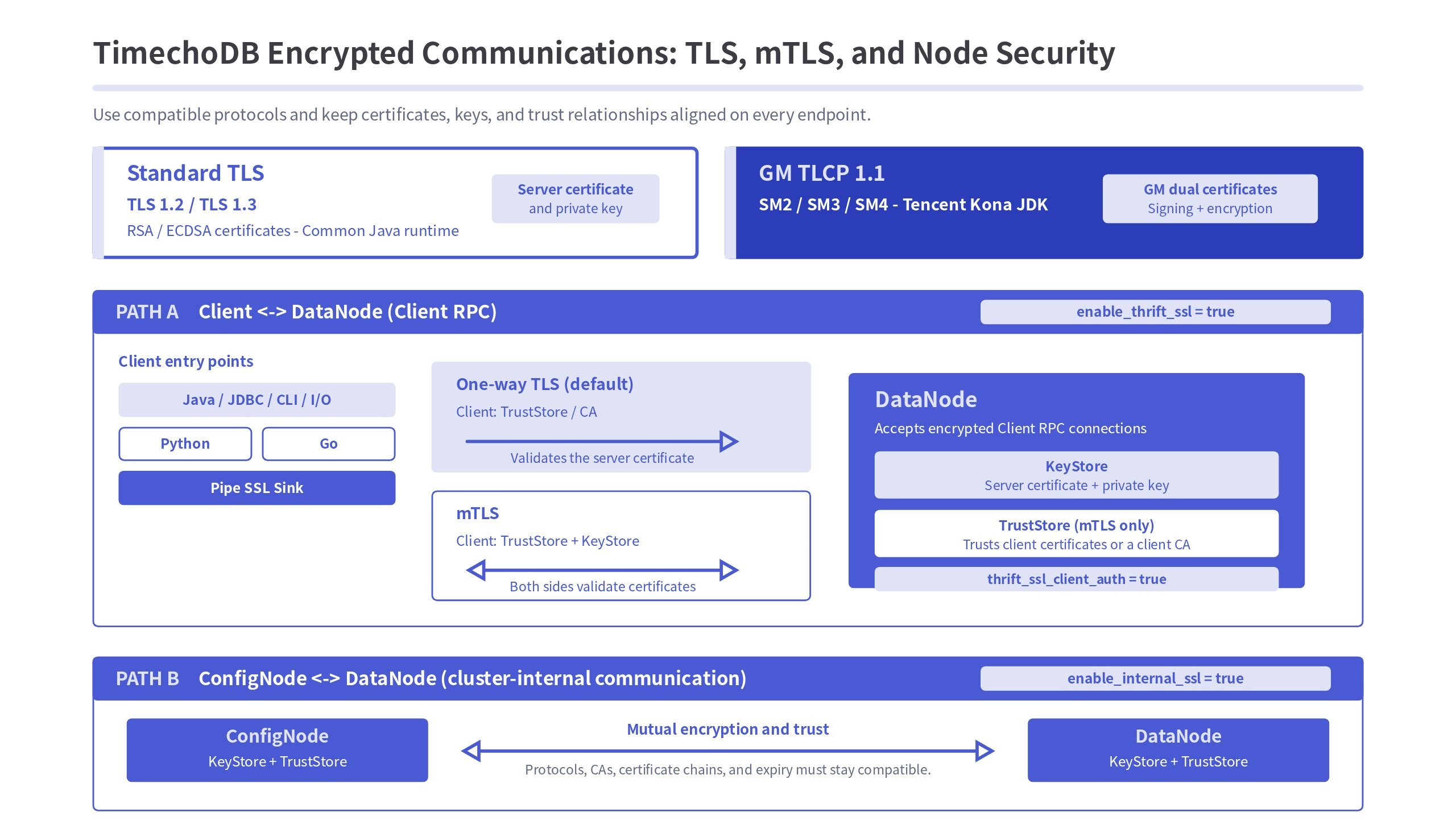
2. Protocol Selection
Use ssl_protocol in iotdb-system.properties to select the communication protocol. The default value is TLS.
ssl_protocol Value | Description |
|---|---|
TLS | Allows the client and server to negotiate TLS 1.3 or TLS 1.2. |
TLSv1.3 | Supports TLS 1.3 only. |
TLSv1.2 | Supports TLS 1.2 only. |
TLCP | Preferentially allows TLCP 1.1 and is also compatible with TLS 1.3 and TLS 1.2. This setting does not guarantee that the connection uses the GM protocol. |
TLCPv1.1 | Supports TLCP 1.1 only. |
To ensure that a connection uses only the GM protocol, configure both the server and client to use TLCPv1.1. When TLCP is used, the connection may fall back to standard TLS.
3. Server Configuration
3.1 Client Communication Encryption
Enable Client RPC communication encryption in the DataNode's iotdb-system.properties file. By default, clients validate only the server certificate:
enable_thrift_ssl=true
ssl_protocol=<protocol>
key_store_path=/path/to/server.keystore
key_store_pwd=<key_store_password>
To require clients to provide certificates, enable client authentication and configure a TrustStore used to validate client certificates:
enable_thrift_ssl=true
thrift_ssl_client_auth=true
ssl_protocol=<protocol>

# Server private key and certificate
key_store_path=/path/to/server.keystore
key_store_pwd=<key_store_password>

# Trust the client certificate or its issuing CA
trust_store_path=/path/to/server.truststore
trust_store_pwd=<trust_store_password>
Restart the DataNode after completing the configuration. After SSL is enabled, clients that access the DataNode through dn_rpc_port must also enable SSL; otherwise, the connection cannot be established.
When thrift_ssl_client_auth=false (the default), the behavior is unchanged from earlier versions: clients only configure a TrustStore to validate the server certificate. When thrift_ssl_client_auth=true, the server requires a client certificate during the TLS handshake. The connection is unavailable if the client does not provide one, the server TrustStore does not trust it, or its private key does not match.
thrift_ssl_client_auth takes effect only when enable_thrift_ssl=true. It does not reuse the REST API client_auth setting, so changing either setting does not affect the other protocol.
3.2 Inter-Node Communication Encryption
Configure the following parameters on every node that participates in internal cluster communication:
enable_internal_ssl=true
ssl_protocol=<protocol>
key_store_path=/path/to/node.keystore
key_store_pwd=<key_store_password>
trust_store_path=/path/to/cluster.truststore
trust_store_pwd=<trust_store_password>
Cluster nodes must establish connections with one another. Therefore, each node must have its own KeyStore and use a TrustStore to trust certificates from other nodes. All nodes must use compatible protocol settings, and the TrustStore must contain the CA that issued the certificates for the cluster nodes.
3.3 Configuration Parameters
| Parameter | Description |
|---|---|
enable_thrift_ssl | Whether to enable DataNode Client RPC communication encryption. Disabled by default. |
thrift_ssl_client_auth | Whether Client RPC clients must provide a certificate during the TLS handshake. Defaults to false. Effective only when enable_thrift_ssl=true; when enabled, configure trust_store_path and trust_store_pwd. |
enable_internal_ssl | Whether to enable internal cluster communication encryption. Disabled by default. |
ssl_protocol | Communication protocol. The default value is TLS. |
key_store_path | Path to the KeyStore file. |
key_store_pwd | KeyStore password. |
trust_store_path | Path to the TrustStore file. For Client RPC mTLS, the server uses it to trust the client certificate or its issuing CA. For internal cluster communication, each node uses it to trust other node certificates. |
trust_store_pwd | TrustStore password. |
4. Standard TLS Communication
Enable communication encryption as described in Section 3 and configure compatible TLS versions on the server and client. Then prepare a server certificate and import the CA that issued the certificate, or the server certificate itself, into the client TrustStore. To enable mTLS, also prepare a client certificate and import the client certificate or its issuing CA into the server TrustStore. See Section 4.5.
4.1 Preparing TLS Certificates
The SAN of the server certificate must include the domain name or IP address that the client actually uses to connect. Otherwise, the client may reject the connection because of hostname verification failure. The following commands show only the certificate generation and import workflow.
4.1.1 Creating the Server KeyStore
keytool -genkeypair \
  -alias timechodb \
  -keyalg RSA \
  -validity <validity_days> \
  -ext SAN=dns:<server_domain>,ip:<server_ip> \
  -keystore server.keystore
4.1.2 Exporting the Server Certificate
keytool -export \
  -alias timechodb \
  -keystore server.keystore \
  -rfc \
  -file server.cer
4.1.3 Creating the Client TrustStore
keytool -import \
  -alias timechodb \
  -file server.cer \
  -keystore client.truststore
4.2 Configuring Java Clients
The following examples apply to Java clients. Ensure that sslProtocol is compatible with the server configuration and specify the TrustStore that trusts the server certificate in trustStore.
4.2.1 SessionPool
SessionPool sessionPool =
    new SessionPool.Builder()
        .nodeUrls(nodeUrls)
        .user("root")
        .password("<password>")
        .maxSize(3)
        .useSSL(true)
        .sslProtocol("TLS")
        .trustStore("/path/to/client.truststore")
        .trustStorePwd("<trust_store_password>")
        .build();
4.2.2 Session
Session session =
    new Session.Builder()
        .host("127.0.0.1")
        .port(6667)
        .username("root")
        .password("<password>")
        .useSSL(true)
        .sslProtocol("TLS")
        .trustStore("/path/to/client.truststore")
        .trustStorePwd("<trust_store_password>")
        .build();
4.3 Configuring JDBC
JDBC communication encryption can be configured through the connection URL or Properties. The following example uses Properties:
Properties info = new Properties();
info.setProperty("user", "root");
info.setProperty("password", "<password>");
info.setProperty("use_ssl", "true");
info.setProperty("ssl_protocol", "TLS");
info.setProperty("trust_store", "/path/to/client.truststore");
info.setProperty("trust_store_pwd", "<trust_store_password>");

try (Connection connection =
        DriverManager.getConnection(
            "jdbc:iotdb://127.0.0.1:6667?version=V_1_0", info);
    Statement statement = connection.createStatement()) {
  // Business logic
}
4.4 Configuring the CLI
Use the interactive mode to enter the database password, TrustStore path, and TrustStore password:
./start-cli.sh \
  -h 127.0.0.1 \
  -p 6667 \
  -u root \
  -usessl true \
  -ssl_protocol TLS \
  -ts -tpw -pw
After running the command, enter the TrustStore path, TrustStore password, and database password in the order prompted.
4.5 Client SSL Mutual Authentication (mTLS)
In one-way TLS, clients verify the server identity and the server does not validate a client certificate. mTLS additionally requires a client certificate during the TLS handshake. The server accepts only connections presenting trusted client certificates. Applications still use a username and password for database authentication; the client certificate adds a transport-layer identity and access-control boundary.
4.5.1 Certificates and Trust Relationships
CA private key and CA certificate
  |- Signs server certificate -> server.keystore
  `- Signs client certificate -> client.keystore

client.truststore: stores the server certificate or its CA so clients can validate the server
server.truststore: stores the client certificate or its CA so the server can validate clients
We recommend importing the issuing CA certificate for client certificates into server.truststore. This lets the same CA issue separate certificates for multiple applications without changing the server TrustStore for each application. To permit one application only, import that application's client certificate instead.
4.5.2 Preparing the Client KeyStore and Server TrustStore
The following example assumes that a usable CA is available. Generate a client private key and CSR, then have the CA sign the CSR. In production, use an enterprise CA or managed CA service.
# 1. Generate a client private key and CSR
keytool -genkeypair \
  -alias client \
  -keyalg RSA \
  -validity <validity_days> \
  -dname "CN=<client_identity>" \
  -keystore client.keystore

keytool -certreq \
  -alias client \
  -keystore client.keystore \
  -file client.csr

# 2. Have an enterprise CA or test CA sign client.csr to obtain client.crt

# 3. Import the CA certificate first, then the signed client certificate to build the chain
keytool -importcert \
  -alias client-ca \
  -file client-ca.crt \
  -keystore client.keystore

keytool -importcert \
  -alias client \
  -file client.crt \
  -keystore client.keystore

# 4. Import the client CA certificate into the server TrustStore
keytool -importcert \
  -alias client-ca \
  -file client-ca.crt \
  -keystore server.truststore
client.keystore must contain the client private key, client certificate, and complete certificate chain. server.truststore can contain the client certificate itself or the CA certificate that issued it.
4.5.3 Configuring Java Session and SessionPool
Add keyStore and keyStorePwd to the one-way TLS configuration:
Session session =
    new Session.Builder()
        .host("127.0.0.1")
        .port(6667)
        .username("root")
        .password("<password>")
        .useSSL(true)
        .sslProtocol("TLS")
        .trustStore("/path/to/client.truststore")
        .trustStorePwd("<trust_store_password>")
        .keyStore("/path/to/client.keystore")
        .keyStorePwd("<key_store_password>")
        .build();
session.open();
SessionPool sessionPool =
new SessionPool.Builder()
.nodeUrls(nodeUrls)
.user("root")
.password("<password>")
.maxSize(3)
.useSSL(true)
.sslProtocol("TLS")
.trustStore("/path/to/client.truststore")
.trustStorePwd("<trust_store_password>")
.keyStore("/path/to/client.keystore")
.keyStorePwd("<key_store_password>")
.build();TableSessionBuilder and TableSessionPoolBuilder also support keyStore(String) and keyStorePwd(String).
4.5.4 Configuring JDBC, CLI, and Import/Export Tools
Add key_store and key_store_pwd to a JDBC URL or Properties:
Properties info = new Properties();
info.setProperty("user", "root");
info.setProperty("password", "<password>");
info.setProperty("use_ssl", "true");
info.setProperty("ssl_protocol", "TLS");
info.setProperty("trust_store", "/path/to/client.truststore");
info.setProperty("trust_store_pwd", "<trust_store_password>");
info.setProperty("key_store", "/path/to/client.keystore");
info.setProperty("key_store_pwd", "<key_store_password>");jdbc:iotdb://127.0.0.1:6667?version=V_1_0&use_ssl=true&ssl_protocol=TLS&trust_store=/path/to/client.truststore&trust_store_pwd=<trust_store_password>&key_store=/path/to/client.keystore&key_store_pwd=<key_store_password>The CLI, data import/export tools, and Schema tools use -ks (or --key_store) for the client KeyStore and -kpw (or --key_store_pwd) for its password:
./start-cli.sh \
  -h 127.0.0.1 \
  -p 6667 \
  -u root \
  -usessl true \
  -ssl_protocol TLS \
  -ts /path/to/client.truststore \
  -tpw <trust_store_password> \
  -ks /path/to/client.keystore \
  -kpw <key_store_password>
When the server does not enable thrift_ssl_client_auth, existing clients do not need -ks or -kpw.
4.5.5 Configuring Python Clients
Python clients use PEM certificate files instead of Java KeyStores and TrustStores. ca_certs validates the server certificate; client_cert and client_key provide the client certificate and private key to the server.
from iotdb.Session import Session

session = Session(
    "127.0.0.1",
    "6667",
    "root",
    "<password>",
    use_ssl=True,
    ca_certs="/path/to/ca.crt",
    client_cert="/path/to/client-chain.crt",
    client_key="/path/to/client.key",
)
session.open(False)
SessionPool PoolConfig, TableSession TableSessionConfig, and TableSessionPool TableSessionPoolConfig also support client_cert and client_key. Set both values together. The private key must be an unencrypted PEM private key.
4.5.6 Configuring Go Clients
Go clients enable TLS through TLSConfig. CAFile validates the server certificate, and CertFile and KeyFile provide the client certificate and private key:
config := &client.Config{
    Host:     "127.0.0.1",
    Port:     "6667",
    UserName: "root",
    Password: "<password>",
    TLSConfig: &client.TLSConfig{
        CAFile:   "/path/to/ca.crt",
        CertFile: "/path/to/client-chain.crt",
        KeyFile:  "/path/to/client.key",
    },
}

session := client.NewSession(config)
if err := session.Open(false, 5000); err != nil {
    log.Fatal(err)
}
defer session.Close()
PoolConfig and ClusterConfig also support TLSConfig. A nil TLSConfig retains a non-SSL connection; configure CertFile and KeyFile together. Go validates the server certificate SAN, so the connection host must be present in the server certificate SAN.
Python and Go clients currently support standard TLS and mTLS only; they do not support TLCP.
4.5.7 Pipe Encrypted Synchronization
iotdb-thrift-ssl-sink uses ssl.trust-store-path and ssl.trust-store-pwd to validate the target DataNode server certificate. If the target enables thrift_ssl_client_auth=true, the Pipe sink also needs a client KeyStore:
CREATE PIPE A2B
WITH SINK (
  'sink'='iotdb-thrift-ssl-sink',
  'node-urls'='127.0.0.1:6667',
  'ssl.trust-store-path'='pki/client.truststore',
  'ssl.trust-store-pwd'='<trust_store_password>',
  'ssl.key-store-path'='pki/client.keystore',
  'ssl.key-store-pwd'='<key_store_password>'
)| Parameter | Description |
|---|---|
ssl.trust-store-path / ssl.trust-store-pwd | TrustStore and password used by the Pipe sink to validate the target DataNode server certificate. |
ssl.key-store-path / ssl.key-store-pwd | KeyStore and password used by the Pipe sink to present a client certificate during the TLS handshake with the target DataNode. |
The semantics are the same with the sink. prefix, for example sink.ssl.key-store-path. When the target uses one-way SSL only, the Pipe sink continues to use its existing TrustStore configuration.
4.5.8 Security Recommendations
- Only certificate administrators may hold the CA private key. Never distribute it to a DataNode or client.
- CA public certificates in a TrustStore may be distributed to validate certificate chains, but cannot issue certificates.
- In production, issue a separate certificate and private key for every application or client identity. Revoke an application through certificate lifecycle management and TrustStore trust policies.
- Restrict read permission on the unencrypted
client.keyused by Python and Go. - The server certificate SAN must include the domain name or IP address clients actually use. The client certificate subject should distinguish the application or access party.
5. GM Communication Encryption
5.1 Prerequisites
Before using TLCP 1.1, ensure that all of the following conditions are met:
- Use Tencent Kona JDK to start the server and related Java clients, and confirm that the JDK supports TLCP 1.1 and SM2.
- The server KeyStore must use the PKCS12 format and contain both the SM2 signing certificate and private key, and the SM2 encryption certificate and private key.
- The TrustStore contains the CA certificate that issued the certificates above.
- Configure the protocol as
TLCPv1.1on both the server and client.
The examples below use tlcp-sign and tlcp-enc as certificate aliases. If the actual certificates use different aliases, use the entry names in the KeyStore.
| Entry | Purpose |
|---|---|
tlcp-sign | TLCP signing certificate and private key. |
tlcp-enc | TLCP encryption certificate and private key. |
ca | CA certificate that issued the signing and encryption certificates. |
5.2 Configuring the Server and Nodes
# Client communication encryption
enable_thrift_ssl=true

# Inter-node communication encryption
enable_internal_ssl=true

# Force TLCP 1.1
ssl_protocol=TLCPv1.1

key_store_path=/path/to/tlcp-keystore.p12
key_store_pwd=<key_store_password>
trust_store_path=/path/to/tlcp-truststore.p12
trust_store_pwd=<trust_store_password>
When only client communication encryption is enabled, you can keep enable_internal_ssl=false as appropriate. When only inter-node communication encryption is enabled, you can keep enable_thrift_ssl=false.
5.3 Configuring Session and SessionPool
When configuring Session or SessionPool, enable SSL, set the protocol to TLCPv1.1, and specify the TLCP TrustStore:
.useSSL(true)
.sslProtocol("TLCPv1.1")
.trustStore("/path/to/tlcp-truststore.p12")
.trustStorePwd("<trust_store_password>")
5.4 TLCP Client Mutual Authentication
Enable TLCP client mutual authentication with thrift_ssl_client_auth=true. Both the server KeyStore and client KeyStore must meet the TLCP dual-certificate requirements: each contains an SM2 signing certificate and private key, and an SM2 encryption certificate and private key. The server TrustStore must trust the CA that issued the two client certificates, and the client TrustStore must trust the CA that issued the two server certificates.
Add the following to the existing TLCP configuration for Java Session or SessionPool:
.keyStore("/path/to/tlcp-client-keystore.p12")
.keyStorePwd("<key_store_password>")
The server, Java clients, CLI, and import/export tools that use TLCP must run on a Kona JDK that supports TLCP 1.1. Python and Go clients do not support TLCP.
5.5 Configuring JDBC
info.setProperty("use_ssl", "true");
info.setProperty("ssl_protocol", "TLCPv1.1");
info.setProperty("trust_store", "/path/to/tlcp-truststore.p12");
info.setProperty("trust_store_pwd", "<trust_store_password>");
When TLCP mTLS is enabled, also set key_store and key_store_pwd to the client TLCP KeyStore and its password.
5.6 Configuring the CLI and Import/Export Tools
When using the CLI, import tool, or export tool to connect to a TLCP port, specify -ssl_protocol TLCPv1.1 and use Kona JDK to start the corresponding tool.
./start-cli.sh \
  -h 127.0.0.1 \
  -p 6667 \
  -u root \
  -pw <password> \
  -usessl true \
  -ssl_protocol TLCPv1.1 \
  -ts /path/to/tlcp-truststore.p12 \
  -tpw <trust_store_password>
When TLCP mTLS is enabled, add -ks /path/to/tlcp-client-keystore.p12 and -kpw <key_store_password>.
5.7 Checking TLCP Certificates
After generating or obtaining the certificates, use keytool from Kona JDK to inspect the KeyStore:
\${KONA_HOME}/bin/keytool -list -v \
  -keystore /path/to/tlcp-keystore.p12 \
  -storetype PKCS12
The KeyStore should contain one private-key entry for the signing certificate and one private-key entry for the encryption certificate. The TrustStore should contain the corresponding CA certificate. The certificate SAN must cover the actual node domain names and IP addresses. When TLCP mTLS is enabled, the client KeyStore must also contain signing and encryption private-key entries and the complete certificate chain.
6. Cluster Change Considerations
- An incorrect certificate, private key, or expired certificate on a node causes that node to fail to start, and the log records the reason.
- If protocol or trust relationships are inconsistent between cluster nodes, a node started later may fail to start because it cannot complete the handshake with the Seed ConfigNode.
- An expired certificate on a running cluster can interrupt inter-node communication and make the cluster unavailable. Replace certificates and validate the cluster before they expire.
- All nodes in a cluster must use consistent protocol and trust settings. Distribute certificates and configuration to all nodes first, then complete the switch according to the cluster shutdown and startup procedure.
- Before enabling Client RPC mTLS, verify in a non-production environment that every client, Pipe task, and automation tool is configured with a client certificate. Existing one-way TLS clients cannot connect after mTLS is enabled.
7. Troubleshooting
| Symptom or Error | Possible Cause | Resolution |
|---|---|---|
TLCPv1.1 SSLContext not available | The current JDK does not support TLCP 1.1. | Use Tencent Kona JDK to start the server or Java client, and confirm the effective JAVA_HOME. |
The CLI displays Connection Error although the server has started successfully. | The current JDK does not support TLCP 1.1, or the client protocol or TrustStore is configured incorrectly. | Confirm that the effective JAVA_HOME points to Tencent Kona JDK with TLCP support, and check the -usessl, -ssl_protocol, -ts, and -tpw parameters. For mTLS, also check -ks and -kpw. |
Unknown named curve: 1.2.156.10197.1.301 | The current JDK cannot recognize the SM2 curve. | Use a JDK that supports SM2, and check the KeyStore and TrustStore again. |
Failed to read key store or trust store | The file path, password, format, or file permissions are incorrect. | Check the path, PKCS12 format, password, and read permission of the runtime account. For Python and Go, also check the PEM file format and read permission. |
| A client cannot connect to an SSL-enabled port. | SSL is not enabled on the client, or the protocol is incompatible with the server. | Enable client SSL and check ssl_protocol and TrustStore. |
| A node cannot join the cluster. | The node protocol configuration is inconsistent, or the certificate is not trusted by other nodes. | Make the node configurations consistent and check the CA, SAN, and certificate validity period. |
A client cannot connect or its first RPC fails after thrift_ssl_client_auth=true is enabled. | The client did not provide a certificate and private key. | Configure a client KeyStore for Java, JDBC, CLI, and tools; configure both the client certificate and private key for Python and Go. |
| The TLS handshake fails and the server log reports that the client certificate is not trusted. | server.truststore does not contain the client certificate or its CA, or the client certificate chain is incomplete. | Import the correct client certificate or CA certificate, confirm the client presents the complete certificate chain, then restart the DataNode. |
| Python or Go fails while creating an SSL context. | Only the client certificate or only the client private key is configured, or the PEM private key is password protected. | Configure the certificate and private key together, and use an unencrypted PEM private key compatible with the client library. |
| A Go client reports that the server certificate hostname does not match. | The connection address is absent from the server certificate SAN. | Connect using a domain name or IP address in the certificate SAN, or issue a server certificate containing the actual address. |