
Data Subscription
Data Subscription
1. Feature Overview
The IoTDB data subscription module, also known as the IoTDB subscription client, provides a streaming data consumption method that differs from scheduled queries. It follows the basic concepts and logic of message queue systems such as Kafka and provides applications with topic management, data subscription, and consumption progress commit capabilities.
Data subscription is not intended to completely replace message queues. It is mainly suitable for the following scenarios:
- Continuously obtain the latest data: Continuously pull newly written data without frequently running scheduled queries. This is suitable for dashboards, supervisory control, and similar scenarios.
- Simplify integration with third-party systems: Systems such as Flink, Kafka, DataX, Camel, MySQL, and PostgreSQL can actively obtain data as subscription clients, without requiring a separate push component in IoTDB for each system.
- Incrementally back up TsFiles: Subscribe to newly generated TsFiles and archive incremental data to a specified storage location.
Note: This feature is supported starting from V2.0.11.1.
2. Key Concepts
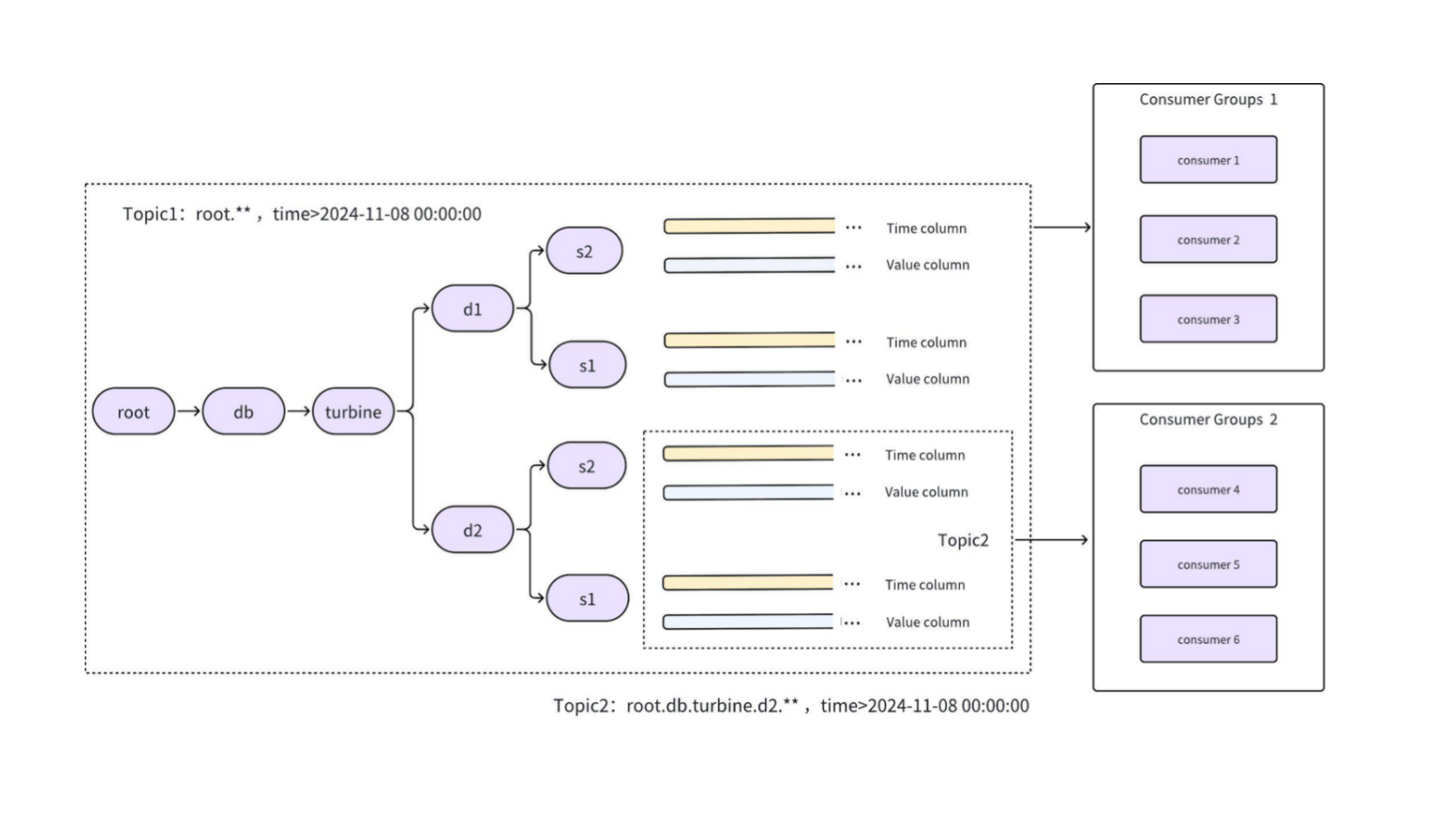
The IoTDB subscription client has three core concepts: Topic, Consumer, and Consumer Group.
2.1 Topic
A Topic is a data space in IoTDB that can be subscribed to. In the tree model, the data range is defined by a path or path pattern, such as root.**. A regular subscription can also use start-time and end-time to limit the Event Time range.
Unlike Kafka, IoTDB allows a Topic to be created after data has already been written. A Topic can output data by row or by TsFile.
The tree model supports the following subscription modes:
| Mode | Description |
|---|---|
initial | A dynamic data set. Consumers can continuously consume matching historical data and subsequently written data. |
snapshot | A static data set. A snapshot is generated at the time a Consumer Group subscribes to the Topic and does not continuously include data written after that snapshot. |
incremental | A real-time incremental data set based on consensus progress. Only data written after the Consumer Group subscribes to the Topic is consumed; historical data written before the subscription is not replayed. |
The tree model supports the following output formats:
| Format | Description |
|---|---|
SubscriptionRecordHandler | Consumes data as a ResultSet or Tablet in a SubscriptionMessage. |
SubscriptionTsFileHandler | Consumes TsFiles through SubscriptionTsFileHandler. |
2.2 Consumer
A Consumer is a subscription client that receives and processes Topic data. The tree model provides two Consumer types:
ISubscriptionTreePullConsumer: Pull mode. It is built withSubscriptionTreePullConsumerBuilder, and application code actively callspoll()to obtain data.ISubscriptionTreePushConsumer: Push mode. It is built withSubscriptionTreePushConsumerBuilder, and newly arrived data triggers a user-providedConsumeListener.
2.3 Consumer Group
Consumers with the same Consumer Group ID belong to the same Consumer Group:
- A Consumer Group can contain multiple Consumers, while a Consumer can join only one Consumer Group.
- A Consumer Group can contain both Pull and Push Consumers.
- Not every Consumer in a Consumer Group is required to subscribe to the same Topic.
- Consumers in the same Consumer Group that subscribe to the same Topic share the consumption workload. A message is assigned to only one Consumer in the group.
- Different Consumer Groups are independent and can consume the same Topic separately.
- Messages that have not been committed successfully may be delivered again after a Consumer restarts or messages are reassigned. Data subscription therefore provides at-least-once semantics, not exactly-once semantics.
3. SQL Statements
3.1 Topic Management
3.1.1 Create a Topic
CREATE TOPIC [IF NOT EXISTS] <topicName>
WITH (
  [<parameter> = <value>,]
);
IF NOT EXISTS prevents an error when the Topic already exists.
Topic configuration
| Parameter | Default | Description |
|---|---|---|
path | root.** | Time-series path or path pattern represented by the Topic. |
start-time | MIN_VALUE | Start of the Event Time range. Supports ISO timestamps, long values matching the database timestamp precision, and the special value now. |
end-time | MAX_VALUE | End of the Event Time range. The supported formats are the same as for start-time. |
processor | do-nothing-processor | Processing plugin applied to the original subscription data. |
format | SubscriptionRecordHandler | Supports SubscriptionRecordHandler and SubscriptionTsFileHandler. |
mode | initial | Supports initial, snapshot, and incremental. initial exports historical data and then continues with incremental data. snapshot exports only the current snapshot. incremental exports only data produced after the subscription starts and depends on IoTConsensus for the DataRegion. Use retention.bytes and retention.ms to configure the retained data size and duration. |
loose-range | "" | Controls coarse filtering of path and time ranges. "" applies strict filtering; time applies coarse time filtering; path applies coarse path filtering; time,path, path,time, or all applies coarse filtering to both. |
Time-range examples:
start-time=MIN_VALUEandend-time=now: subscribe only to historical data.start-time=nowandend-time=MAX_VALUE: subscribe only to real-time data.nowrepresents the Topic creation time.
Examples
Subscribe to all data:
CREATE TOPIC root_all;Subscribe to a specified path and time range:
CREATE TOPIC IF NOT EXISTS db_timerange
WITH (
  'path' = 'root.db.**',
  'start-time' = '2023-01-01',
  'end-time' = '2023-12-31'
);
Subscribe to newly generated TsFiles:
CREATE TOPIC topic_all_tsfile
WITH (
  'path' = 'root.**',
  'format' = 'SubscriptionTsFileHandler'
);
Create a real-time incremental Topic based on consensus progress:
CREATE TOPIC topic_realtime_consensus
WITH (
  'path' = 'root.db.**',
  'mode' = 'incremental',
  'retention.bytes' = '536870912',
  'retention.ms' = '3600000'
);
3.1.2 Drop a Topic
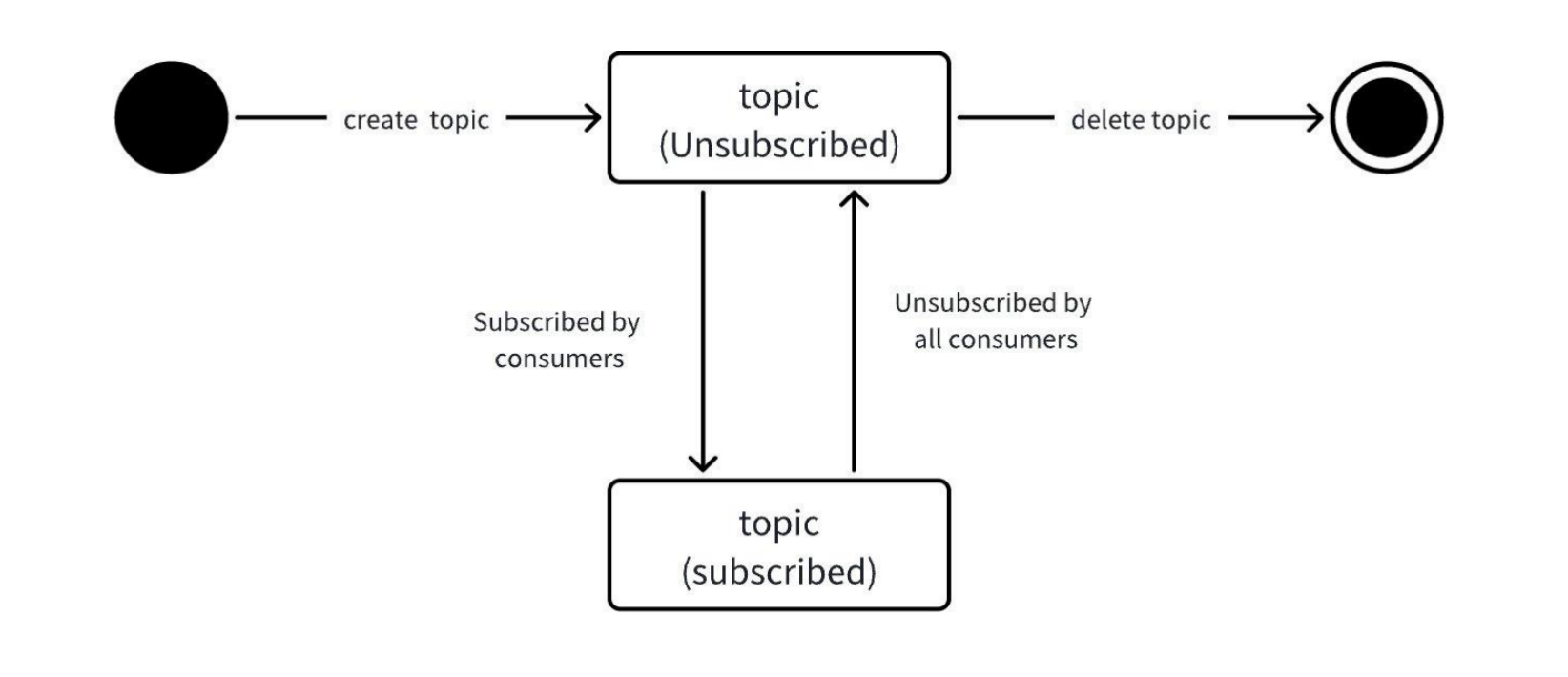
Only an unsubscribed Topic can be dropped. When a Topic is dropped, its associated consumption progress is cleared.
DROP TOPIC [IF EXISTS] <topicName>;IF EXISTS runs the operation only when the Topic exists and prevents an error for a nonexistent Topic.
3.1.3 Show Topics
SHOW TOPICS;
SHOW TOPIC <topicName>;
Result set:
[TopicName|TopicConfigs]TopicName: Topic name.TopicConfigs: Configuration specified in theWITHclause when the Topic was created.
Querying a nonexistent Topic returns an empty result set.
3.2 Show Subscription Status
SHOW SUBSCRIPTIONS;
SHOW SUBSCRIPTIONS ON <topicName>;
Result set:
[SubscriptionID|TopicName|ConsumerGroupName|SubscribedConsumers]SubscriptionID: Subscription relationship ID.TopicName: Topic name.ConsumerGroupName: Consumer Group ID.SubscribedConsumers: IDs of all Consumers in the Consumer Group that subscribe to this Topic.
4. API
In addition to SQL statements, IoTDB provides Java native APIs for data subscription. For details, see Data Subscription API.
4.1 Authorization
- Metadata authorization
- Creating or dropping a Topic requires the
SYSTEMprivilege. - A user with the
SYSTEMprivilege can view global resources when querying Topics and subscription relationships. Other users can view only their own resources.
- Creating or dropping a Topic requires the
- Runtime authorization
- A Consumer supplies
usernameandpasswordthrough Properties or a Builder. Identity is verified byopen(), and subscription authorization is checked bysubscribe(). Data query privileges are checked dynamically during consumption. Data without the required privilege is skipped or reported according to settings such asif-no-privileges.
- A Consumer supplies
- Consumer Group credential consistency
- All Consumers in the same Consumer Group must use the same username and password. The first Consumer that opens successfully establishes the authorization baseline for the group. Later Consumers can join only when their credentials match.
5. FAQ
5.1 How does IoTDB data subscription differ from Kafka?
- Consumption order
- Kafka guarantees ordering within a single partition. When a Topic has one partition and only one single-threaded Consumer subscribes to it, the consumption order matches the write order.
- The IoTDB subscription client does not guarantee that consumption order matches write order, although it attempts to reflect write order.
- Message delivery semantics
- Kafka can be configured to provide exactly-once semantics for Producers and Consumers.
- The IoTDB subscription client does not provide exactly-once semantics for Consumers.
5.2 What should I consider when using data subscription?
- Real-time data is consumed in arrival order within a single Region. Global ordering across Regions and ordering by Event Time are not guaranteed.
- Uncommitted messages may be delivered again after a Consumer restart or reassignment.
- Downstream systems should use idempotent writes or deduplication to handle duplicate data. Applications that depend on Event Time ordering must handle out-of-order data themselves.