


This user-contributed article discusses Apache IoTDB 1.3.3 tree-model design practices for energy IoT scenarios. It covers path hierarchy planning, data type, encoding and compression choices, 3C3D cluster access through SessionPool, and an initialization workflow that synchronizes site, device, and measurement metadata from a master data system.
Note: 3C3D cluster, meaning three ConfigNodes and three DataNodes
Tree Model Path Design
Apache IoTDB's tree model uses root as its root node, and each time series is identified by a hierarchical path. For energy-sector IoT systems, a path design should balance semantic clarity, prefix query performance, and permission isolation granularity.
This example uses a four-level hierarchy:
root.{siteEnglishName}.{devicePrefix}_{deviceCode}.{measurement}Path Hierarchy Specification
Tree Structure Example
The following example shows the complete path hierarchy for two energy sites:
root
├── Site_NJ_East            # NJ East Energy Storage Station
│   ├── BAT_001A            # No. 1 Battery Cabin Cluster A
│   │   ├── CellVoltage     # Cell Voltage (V)
│   │   ├── CellTemp        # Cell Temperature (°C)
│   │   ├── ClusterCurrent  # Cluster Current (A)
│   │   └── SOC             # State of Charge (%)
│   ├── PCS_002B            # No. 2 Power Conversion System
│   │   ├── ActivePower     # Active Power (kW)
│   │   ├── ReactivePower   # Reactive Power (kVar)
│   │   ├── GridFreq        # Grid Frequency (Hz)
│   │   └── RunState        # Operating Status Code
│   ├── EMS_003C            # Energy Management System
│   │   ├── DispatchCmd     # Dispatch Command
│   │   └── AlarmLevel      # Alarm Level
│   └── ENV_004D            # Environment Sensor
│       ├── AmbientTemp     # Ambient Temperature
│       └── Humidity        # Humidity (%)
└── Site_BJ_North           # BJ North PV Station
    ├── INV_010X            # 10# Inverter
    │   ├── DCVoltage       # DC Voltage
    │   ├── DCCurrent       # DC Current
    │   └── Efficiency      # Conversion Efficiency
    └── MET_020Y            # 20# Gateway Electric Meter
        ├── TotalActiveEnergy # Total Active Energy
        └── PowerFactor     # Power Factor
Note: Underscores are valid in device codes. Avoid reserved characters in unquoted identifiers, and keep path length within 128 characters to reduce metadata memory consumption.
Choosing Data Types, Encodings and Compression Algorithms
IoTDB supports multiple data types, encoding schemes, and compression algorithms. Because energy-system measurements have very different characteristics, choose a combination that balances storage efficiency, query performance, and precision requirements.
Data Type Selection Comparison
Selection Guidelines
INT32 + TS_2DIFF: Second-order differential encoding for integer time series data (e.g., status codes 0/1/2), featuring a high compression ratio and fast decoding speed.
DOUBLE + GORILLA: XOR-based encoding optimized for floating-point data, suitable for continuously changing measurements, such as voltage and current, that require high precision.
STRING + DICTIONARY: Dictionary encoding delivers outstanding compression performance for highly repetitive strings (e.g., firmware versions, device models).
SNAPPY in this Design: A general-purpose compression algorithm with low CPU overhead, ideal for high-concurrency write workloads. ZSTD can be adopted as an alternative if disk space conservation is prioritized.
SQL Example: Create Time Series
The following SQL creates time series with explicit data types, encodings, and compression settings for battery cabins and power-conversion systems:
-- 1. Create database (a logical concept, corresponds to path prefix under tree model)
CREATE DATABASE root.Site_NJ_East;

-- 2. Measurement points of the battery cabin: voltage, temperature, current, SOC
CREATE TIMESERIES root.Site_NJ_East.BAT_001A.CellVoltage
  WITH DATATYPE=DOUBLE, ENCODING=GORILLA, COMPRESSOR=SNAPPY;

CREATE TIMESERIES root.Site_NJ_East.BAT_001A.CellTemp
  WITH DATATYPE=DOUBLE, ENCODING=GORILLA, COMPRESSOR=SNAPPY;

CREATE TIMESERIES root.Site_NJ_East.BAT_001A.ClusterCurrent
  WITH DATATYPE=DOUBLE, ENCODING=GORILLA, COMPRESSOR=SNAPPY;

CREATE TIMESERIES root.Site_NJ_East.BAT_001A.SOC
  WITH DATATYPE=INT32, ENCODING=TS_2DIFF, COMPRESSOR=SNAPPY;

-- 3. Measurement points of power conversion system: power, frequency, status
CREATE TIMESERIES root.Site_NJ_East.PCS_002B.ActivePower
  WITH DATATYPE=DOUBLE, ENCODING=GORILLA, COMPRESSOR=SNAPPY;

CREATE TIMESERIES root.Site_NJ_East.PCS_002B.GridFreq
  WITH DATATYPE=DOUBLE, ENCODING=GORILLA, COMPRESSOR=SNAPPY;

CREATE TIMESERIES root.Site_NJ_East.PCS_002B.RunState
  WITH DATATYPE=INT32, ENCODING=TS_2DIFF, COMPRESSOR=SNAPPY;

-- 4. String-type measurement point: device serial number (low-frequency writes, dictionary encoding)
CREATE TIMESERIES root.Site_NJ_East.BAT_001A.DeviceSN
  WITH DATATYPE=STRING, ENCODING=DICTIONARY, COMPRESSOR=SNAPPY;
Java Example: Batch Creation via Session
In a production system, the number of measurement points may range from thousands to tens of thousands, making manual SQL scripts impractical. Use the IoTDB Java Session API to create time series in batches.
public void createTimeseriesBatch(Session session, List<PointMeta> points) throws IoTDBConnectionException, StatementExecutionException {
    List<String> paths = new ArrayList<>();
    List<TSDataType> dataTypes = new ArrayList<>();
    List<TSEncoding> encodings = new ArrayList<>();
    List<CompressionType> compressors = new ArrayList<>();

    for (PointMeta p : points) {
        String path = String.format("root.%s.%s_%s.%s",
            p.getSiteEnglishName(),
            p.getDevicePrefix(),
            p.getDeviceCode(),
            p.getMeasurement());
        paths.add(path);
        dataTypes.add(p.getDataType());        // DOUBLE / INT32 / STRING
        encodings.add(p.getEncoding());          // GORILLA / TS_2DIFF / DICTIONARY
        compressors.add(CompressionType.SNAPPY);
    }

    session.createMultiTimeseries(
        paths,
        dataTypes,
        encodings,
        compressors,
        null,  // tags
        null,  // attributes
        null   // props
    );
}
Note: Creating time series is a metadata operation replicated across IoTDB ConfigNodes in a 3C3D cluster. Keep each batch to 500 time series or fewer to avoid excessive memory pressure on ConfigNodes.
Master Data Synchronization: From Business Systems to IoTDB
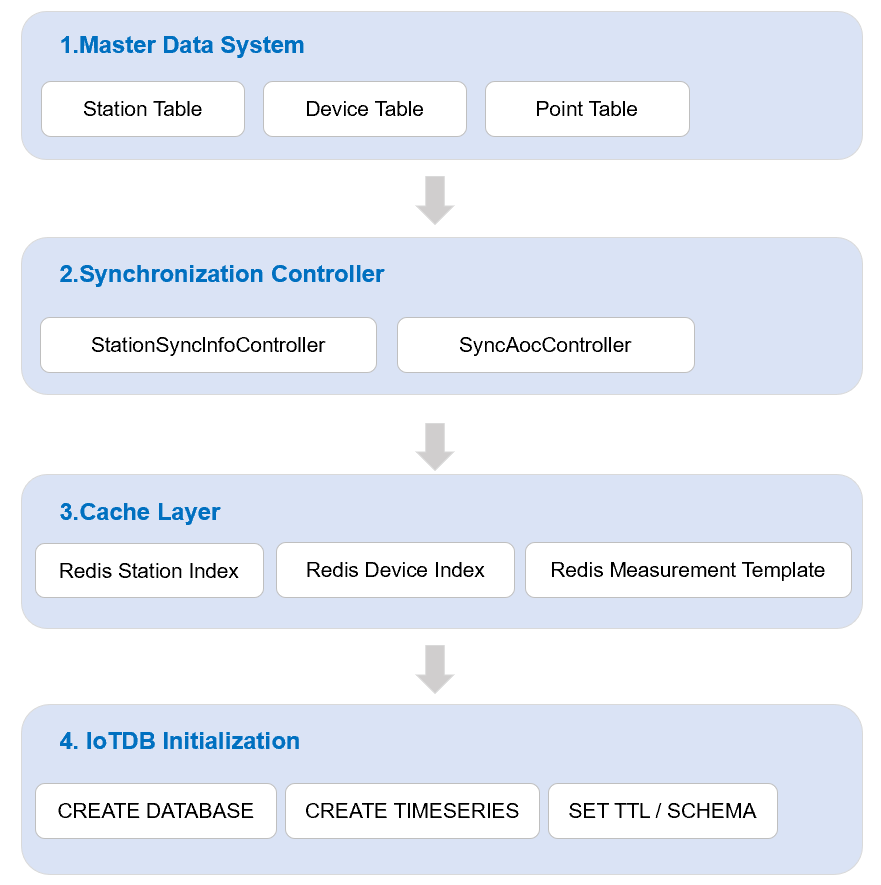
Time series paths are derived from three core master data entities—sites, devices, and measurement points—stored in the enterprise master data system. The first step of the initialization workflow is synchronizing this metadata to IoTDB, which then drives the creation of time series paths.
Synchronization Architecture
Core Synchronization Interfaces
StationSyncInfoController manages station-level metadata synchronization, while SyncAocController handles device and measurement point synchronization (AOC, Asset Operation Center). Both controllers are triggered by scheduled tasks and event listeners.
@RestController
@RequestMapping("/api/v1/sync")
public class StationSyncInfoController {

    @Autowired
    private StationService stationService;
    @Autowired
    private RedisTemplate<String, Object> redisTemplate;
    @Autowired
    private IoTDBInitService iotdbInitService;

    // Full synchronization: used for initial setup or scheduled catch-up
    @PostMapping("/station/full")
    public ResponseEntity<String> syncAllStations() {
        List<Station> stations = stationService.fetchAllActive();
        for (Station s : stations) {
            // 1. Write to Redis cache to accelerate subsequent queries
            redisTemplate.opsForValue().set(
                "station:" + s.getEnglishName(), s, Duration.ofHours(1));

            // 2. Trigger IoTDB database creation
            iotdbInitService.createDatabase("root." + s.getEnglishName());

            // 3. Cascading synchronization for devices and measurement points under this station
            syncDevicesForStation(s.getId(), s.getEnglishName());
        }
        return ResponseEntity.ok("Synced " + stations.size() + " stations.");
    }

    // Incremental synchronization: listens to master data change events
    @EventListener
    public void onStationChanged(StationChangedEvent event) {
        Station s = event.getStation();
        redisTemplate.opsForValue().set(
            "station:" + s.getEnglishName(), s, Duration.ofHours(1));
        iotdbInitService.createDatabase("root." + s.getEnglishName());
    }
}
@RestController
@RequestMapping("/api/v1/sync/aoc")
public class SyncAocController {

    @Autowired
    private AocDeviceService aocDeviceService;
    @Autowired
    private RedisTemplate<String, Object> redisTemplate;
    @Autowired
    private IoTDBInitService iotdbInitService;

    // Synchronize devices and measurement points by station
    @PostMapping("/device/{stationEnglishName}")
    public ResponseEntity<String> syncDevices(
            @PathVariable String stationEnglishName) {
        List<Device> devices = aocDeviceService
            .fetchByStation(stationEnglishName);

        for (Device d : devices) {
            // Cache device metadata
            String deviceKey = String.format("device:%s:%s_%s",
                stationEnglishName, d.getPrefix(), d.getCode());
            redisTemplate.opsForValue().set(deviceKey, d, Duration.ofHours(1));

            // Synchronize measurement points under this device and create IoTDB paths in batches
            List<PointMeta> points = aocDeviceService
                .fetchPointsByDevice(d.getId());
            iotdbInitService.createTimeseriesBatch(
                stationEnglishName, d.getPrefix(), d.getCode(), points);
        }
        return ResponseEntity.ok("Synced " + devices.size() + " devices.");
    }
}
Note: Redis not only accelerates metadata lookups; it also provides a mapping index between master data and IoTDB paths. During data ingestion, resolve path templates from Redis before falling back to the relational database.
Cluster Access: IoTDB 1.3.3 3C3D & SessionPool
The production environment uses an IoTDB 1.3.3 3C3D cluster (3 ConfigNodes and 3 DataNodes). The client implements multi-node load balancing and failover through SessionPool.
Cluster Node Configuration (Anonymized Example)
Java SessionPool Multi-node Configuration
@Configuration
public class IoTDBConfig {

    @Bean
    public SessionPool sessionPool() {
        List<String> nodeUrls = Arrays.asList(
            "192.0.2.11:6667",   // Sample dn-01, non-real address
            "192.0.2.12:6667",   // Sample dn-02, non-real address
            "192.0.2.13:6667"    // Sample dn-03, non-real address
        );

        SessionPool pool = new SessionPool(
            nodeUrls,            // List of multi-node addresses
            "root",              // Username
            "iotdb_pass",        // Password (in production, use a config center with encryption)
            3,                   // Maximum concurrent connections
            1000L,               // Request timeout (ms)
            60000L,              // Idle connection timeout (ms)
            false,               // Disable RPC compression; enable only when network bandwidth is the bottleneck and CPU budget is sufficient
            true                 // Enable automatic retry
        );

        // Connection pool warmup: eliminate high latency on the first write after startup
        pool.setEnableQueryRedirection(true);
        return pool;
    }
}
Note: In a cluster deployment, nodeUrls typically points to DataNode RPC endpoints. With query redirection enabled, the client can auto-route requests to the appropriate node. When the cluster scales out, restart the client to detect new nodes — no configuration file changes required. For exact behavior, refer to the IoTDB client documentation for your production version.
Batch Write Example with SessionPool
public void insertBatch(SessionPool pool, String devicePath, List<Record> records)
        throws IoTDBConnectionException, StatementExecutionException {
    List<String> measurements = Arrays.asList("CellVoltage", "CellTemp", "SOC");
    List<TSDataType> types = Arrays.asList(
        TSDataType.DOUBLE, TSDataType.DOUBLE, TSDataType.INT32);

    Tablet tablet = new Tablet(devicePath, measurements, types, records.size());
    for (Record r : records) {
        tablet.addTimestamp(tablet.rowSize, r.getTimestamp());
        tablet.addValue("CellVoltage", tablet.rowSize, r.getVoltage());
        tablet.addValue("CellTemp", tablet.rowSize, r.getTemperature());
        tablet.addValue("SOC", tablet.rowSize, r.getSoc());
        tablet.rowSize++;
    }

    pool.insertTablet(tablet);
}
Summary of Initialization Workflow
Together, these steps create an end-to-end initialization workflow, from a master data change to available IoTDB time series paths.
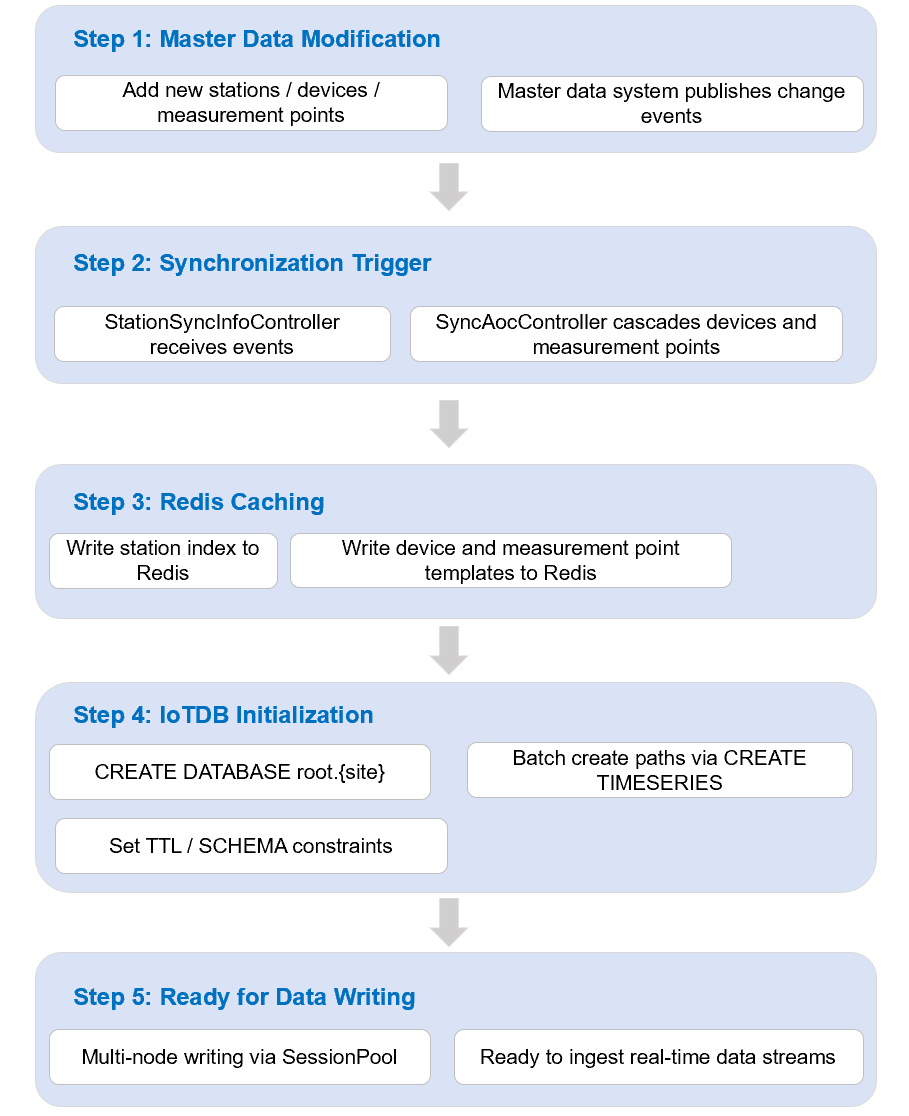
Note: After initialization completes, execute SHOW TIMESERIES root.{site}.* to verify that the time series paths exist and check whether data types and encodings are configured correctly. Automated verification scripts should be integrated into CI/CD pipelines to avoid write failures resulting from incomplete master data synchronization.
Closing Remarks & Next Article Preview
Tree model design is a critical part of an Apache IoTDB implementation. Once the time series path hierarchy is in production, later changes can require costly data migration and application refactoring.
Before production initialization, follow a four-step workflow: Master Data Synchronization → Path Generation → Review and Confirmation → Batch Time Series Creation. This process helps ensure that the path design can accommodate the next three to five years of business growth.
This article is based on real-world energy IoT platform implementation practices. All IP addresses, site names, and device codes have been anonymized. Follow the “IoTDB End-to-End Architecture” series for further practical insights into time series database architecture design.
Next in this series: Real-Time and Historical Query Service Design — covering last value queries, time window historical curves, aggregate downsampling, and large-scale data export to OSS/CSV, with SQL optimization, query caching, pagination, and rate limiting strategies.


